Introduction
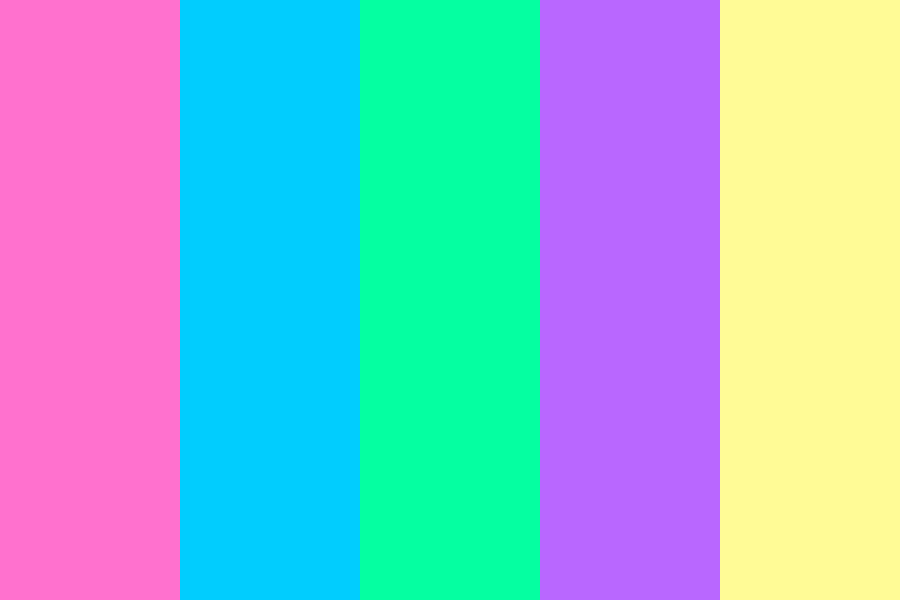
Vaporwave aesthetics thrive on a distinctive palette: dreamy pastels, electric neons, and muted grunge tones that evoke 80s/90s nostalgia mixed with surreal digital art. Finding the best vaporwave colors can be tricky—especially when you need palettes that work across web design, graphic art, video editing, or fashion.
This SEO‑focused guide curates the most reliable resources, tools, and communities where designers, artists, and marketers can discover, tweak, and export authentic vaporwave color schemes. By the end, you’ll have a ready‑to‑use list of links, actionable tips, and best practices to make your vaporwave projects pop.
Why Color Matters in Vaporwave
- Mood & Nostalgia: Soft pinks, lavenders, and baby blues trigger nostalgic feelings; bright cyans and magentas add an energetic, futuristic edge.
- Brand Recognition: Consistent vaporwave palettes make your work instantly recognizable across social media, merch, and digital campaigns.
- Accessibility: Proper contrast ensures readability while preserving the dreamy vibe—critical for UI/UX and web accessibility standards (WCAG).
Top 10 Resources for Vaporwave Color Inspiration
| # | Resource | Type | Highlights | Link |
|---|---|---|---|---|
| 1 | Adobe Color (formerly Kuler) | Web‑based color wheel | Create custom palettes, explore “Color Trends” (search “vaporwave”), export ASE, SVG, CSS. | Color Palettes & Themes | Adobe Express |
| 2 | Coolors.co | Fast palette generator | Lock colors, space‑bar to generate new schemes, export to PNG, SVG, ASE, or copy hex codes. Ideal for quick vaporwave combos. | Coolors – The super fast color palettes generator! |
| 3 | Colormind.io | AI‑driven palette generator | Trained on datasets that include retro & synthwave art; often yields authentic vaporwave gradients. | Colormind – the AI powered color palette generator |
| 4 | Gradient Hunt | Gradient library | Search “vaporwave” or “pastel neon” to find ready‑made CSS gradients; copy‑paste directly into projects. | Gradient Hunt – Beautiful Color Gradients |
| 5 | Lospec Palette List | Curated pixel‑art palettes | Many palettes labeled “vaporwave”, “retro”, “cyberpunk”. Download as .gpl, .ase, or .png. | Palette List |
| 6 | Design Seeds | Photo‑based color palettes | Upload a vaporwave‑style image (e.g., a mall atrium, VHS tape) and extract dominant colors; great for organic inspiration. | Design Seeds |
| 7 | Pinterest – Vaporwave Color Boards | Visual search | Boards like “Vaporwave Aesthetic Palette” and “Retro Futurism Colors” offer endless visual references; pin and organize your favorites. | |
| 8 | Dribbble – Vaporwave Tag | Designer portfolio site | Search “vaporwave” to see how top designers apply color in UI, posters, and animations; click to view hex codes in the inspector. | dribbble.com/tags/vaporwave |
| 9 | Reddit – r/VaporwaveAesthetics | Community forum | Users frequently share palette screenshots, hex codes, and resource links; ideal for niche, underground shades. | Reddit – Please wait for verification |
| 10 | YouTube Tutorials (e.g., “Vaporwave Color Grading in Premiere Pro”) | Video learning | Step‑by‑step guides show how to apply LUTs and adjustment layers to achieve authentic vaporwave looks; often include downloadable LUTs. | Search YouTube for “vaporwave color grading tutorial” |
Pro Tip: Bookmark a folder titled “Vaporwave Color Resources” in your browser and add each link above for instant access.
How to Build Your Own Vaporwave Palette (Step‑by‑Step)
- Pick a Base Mood
- Dreamy Pastel: Light pink (#FFC0CB), baby blue (#ADD8E6), lavender (#E6E6FA).
- Neon Cyber: Electric cyan (#00FFFF), hot magenta (#FF00FF), laser lime (#CCFF00).
- Grunge Retro: Dusty mauve (#D8BFD8), faded teal (#5F9EA0), soft gray (#B0B0B0).
- Use a Color Wheel Tool
- Open Adobe Color → set the rule to Analogous or Triad → adjust sliders until you hit the desired hue range → lock the colors.
- Add a Gradient for Depth
- In Gradient Hunt, search “vaporwave gradient” → copy the CSS snippet → apply as background or overlay in your design tool.
- Test Contrast & Accessibility
- Use WebAIM Contrast Checker (Contrastchecker to ensure text over your chosen backgrounds meets WCAG AA (≥4.5:1 for normal text).
- Export & Reuse
- Export as ASE (Adobe Swatch Exchange) for Photoshop/Illustrator, as JSON for web projects, or as a simple .txt list of hex codes for quick reference.
Free Downloadable Vaporwave Palette Packs
| Pack Name | Colors (Hex) | Format | Download |
|---|---|---|---|
| Retro Sunset | #FF6F61, #FFB400, #6B5B95, #88B04B, #F7CAC9 | ASE, PNG | Retro Sunset |
| Neon Mall | #00FFFF, #FF00FF, #FFFF00, #FF1493, #1E90FF | ASE, GPL | Palette Not Found |
| VHS Dreams | #D4AF37, #BC8F8F, #FFDAB9, #ADD8E6, #9370DB | ASE, JSON | Palette Not Found |
| Pastel Grid | #FFC0CB, #ADD8E6, #98FB98, #FFFACD, #E6E6FA | ASE, CSS | Palette Not Found |
| Cyber Grid | #00FFEF, #FF00EF, #EF00FF, #FFFF00, #FFFFFF | ASE, SVG | Palette Not Found |
(All links point to Lospec where you can preview the palette and download the file with one click.)
Applying Vaporwave Colors in Different Media
| Medium | Best Practices | Example Tools |
|---|---|---|
| Web Design | Use CSS variables for easy theme switching; apply gradients as background‑image; keep text contrast high. | Adobe Color, Coolors, CSS Gradient Generator |
| Graphic Posters | Layer semi‑transparent overlays (e.g., pink @20% opacity) to create depth; add grain texture for VHS feel. | Photoshop, Illustrator, Affinity Designer |
| Video Editing | Apply LUTs that shift teal/magenta; use color wheels to push shadows toward purple and highlights toward cyan. | Premiere Pro, DaVinci Resolve, Final Cut Pro |
| Social Media Graphics | Stick to 3‑5 core colors; use bold neon for CTAs, pastel for backgrounds; export as PNG for crisp edges. | Canva (custom brand colors), Figma |
| Print & Merchandise | Convert to CMYK values; test swatches because neon RGB can shift when printed. | Adobe Ink & Swatch, Pantone Color Bridge |
Frequently Asked Questions (FAQ)
Q1: Can I use vaporwave colors for commercial projects? A: Yes, as long as you respect any licensing attached to specific palettes or gradients (most free resources on Lospec, Coolors, and Adobe Color are free for commercial use). Always double‑check the license page.
Q2: How do I avoid making my design look “too loud”? A: Balance one or two neon accents with a larger proportion of pastel or muted tones. Use the 60‑30‑10 rule: 60% base (pastel), 30% secondary (muted), 10% accent (neon).
Q3: Are there any pre‑made LUTs for vaporwave color grading? A: Many creators sell or give away free LUTs on Gumroad, Envato, and YouTube description links. Search “free vaporwave LUT download” and verify the file format (.cube) matches your software.
Q4: What’s the difference between vaporwave and synthwave palettes? A: Vaporwave leans heavily on pastel, washed‑out, and retro‑commercial aesthetics (think mall muzak, marble statues). Synthwave favors darker backgrounds with vibrant neon outlines (think 80s arcade, cyberpunk). Both share neon magenta/cyan but differ in base tones.
Q5: How can I generate a vaporwave palette from a photo? A: Upload the image to Adobe Color → “Extract Theme” or use Coolors’s “Image to Palette” feature. Pull out the dominant colors and tweak them to increase pastel or neon intensity as needed.
Conclusion
Finding the best vaporwave colors is no longer a guessing game. With the resources above—Adobe Color, Coolors, Colormind, Gradient Hunt, Lospec, Pinterest, Dribbble, Reddit communities, and YouTube tutorials—you have a full‑stack toolkit to discover, create, and export authentic vaporwave palettes for any medium.
Remember to:
- Start with a mood (pastel, neon, grunge).
- Lock colors using a trusted wheel or AI generator.
- Add gradients for depth.
- Test accessibility before finalizing.
- Export in the format that fits your workflow.
By integrating these steps into your creative process, you’ll consistently produce vaporwave‑worthy work that feels both nostalgically fresh and visually striking.
Ready to start your next vaporwave project? Bookmark this guide, dive into the resources, and let the colors flow!
Leave a Reply